
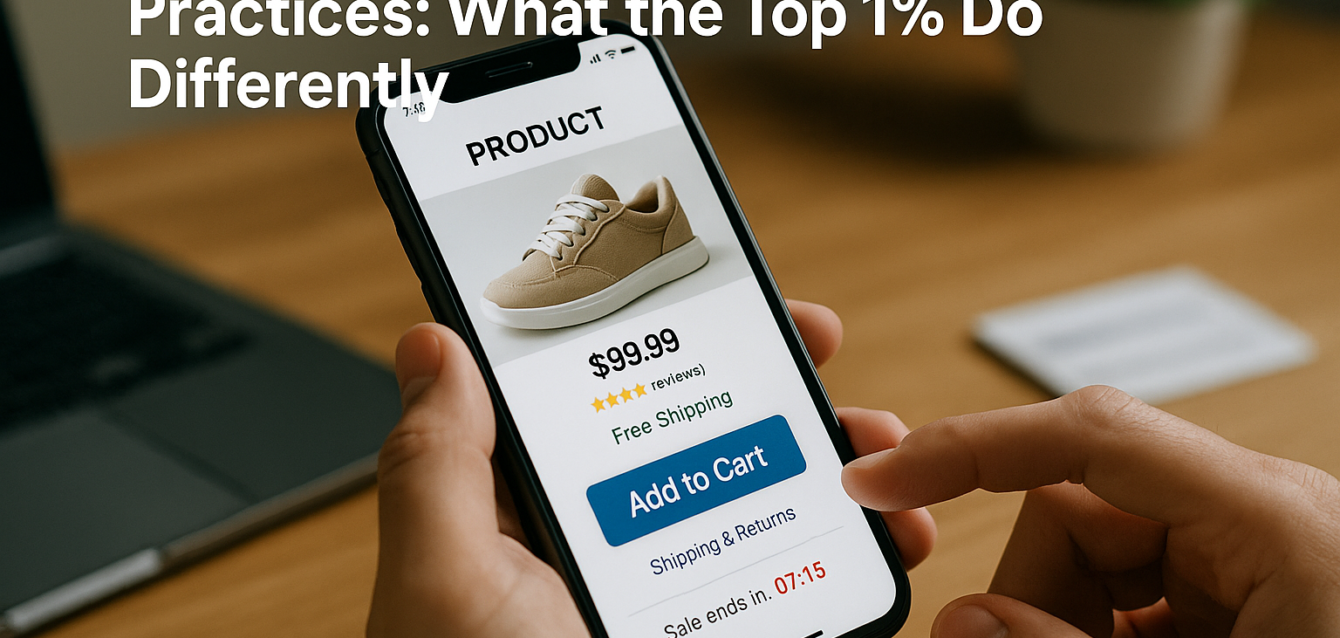
Ecommerce Landing Page Best Practices: What the Top 1% Do Differently
The best ecommerce landing page best practices focus on one thing: reducing buyer hesitation before checkout. High-converting ecommerce landing pages use clear product positioning, strong product visuals, review proof, scarcity triggers, sticky CTAs, fast mobile UX, trust signals, and friction-free purchase paths.
Most ecommerce landing pages do not fail because the product is bad. They fail because the page does not answer buyer doubts fast enough. Shoppers want to know what the product does, why it is better, whether other people trust it, how fast it ships, whether returns are easy, and what happens after they click “Add to Cart.”
In our audits of 200+ landing pages, we have found that top ecommerce pages feel less like product catalogs and more like guided buying experiences. Before adding more apps or increasing ad spend, run a free CRO audit to find the conversion leaks hurting sales.
This guide breaks down the patterns we see on high-converting Shopify, WooCommerce, and ecommerce landing pages.
What Is an Ecommerce Landing Page?
An ecommerce landing page is a product-focused page designed to turn shoppers into buyers, subscribers, or add-to-cart actions.
Unlike a homepage or collection page, an ecommerce landing page is usually built around one product, one offer, one bundle, one audience, or one campaign. It may support paid ads, influencer campaigns, email promotions, product launches, seasonal offers, or organic search traffic.
A product page helps shoppers browse. An ecommerce landing page helps shoppers decide.
Shopify’s ecommerce conversion rate guide reports that 1.6% of global ecommerce visits converted into purchases in Q3 2025, while other sources cited by Shopify put the global average at 2.95%. These benchmarks are useful, but your own conversion rate depends on traffic source, product price, brand awareness, offer strength, device mix, and checkout friction.
The strongest ecommerce landing pages usually include:
A clear product promise above the fold
Product images and video that answer buyer questions
Review proof near the first CTA
Sticky or repeated add-to-cart buttons
Shipping, return, and guarantee clarity
Scarcity or urgency when real
Fast mobile performance
Product structured data
Exit-intent capture for shoppers who are not ready
Heatmap and session recording review
For ecommerce teams, the goal is not just more clicks. The goal is more revenue per visitor, higher add-to-cart rate, higher checkout start rate, higher purchase rate, and stronger average order value.
The Dreamer Designs Ecommerce CRO Framework
The Dreamer Designs Ecommerce CRO Framework reviews the page elements that top ecommerce landing pages use to reduce hesitation and increase sales.
This framework is built around one idea: every section of an ecommerce landing page should answer a buyer objection before it becomes a reason to leave.
The most common ecommerce buyer questions are simple:
Is this product right for me?
Can I see it clearly?
Do other people like it?
Is the price fair?
Is shipping fast?
Can I return it?
Is checkout safe?
Is this offer available later?
What happens if I do not buy now?
Pull-quote stat: In our analysis of 200+ landing pages, ecommerce pages with early product proof, clear shipping reassurance, and mobile-friendly CTAs had fewer trust gaps than pages that buried reviews and policies near the footer.
Before rebuilding your Shopify or WooCommerce page, use a conversion rate optimization tool to identify whether the issue is message clarity, proof placement, page speed, CTA visibility, mobile UX, or checkout friction.
1. Lead With a Product Promise, Not a Brand Slogan
The best ecommerce landing pages tell shoppers what the product does and why it matters within the first screen.
A vague hero headline like “Designed for Everyday Life” may sound polished, but it does not explain the product. A stronger headline says what the product helps the buyer do, feel, avoid, or achieve.
For example:
“Wrinkle-Free Work Shirts That Stay Sharp All Day” is stronger than “Modern Essentials for Professionals.”
“Hydrating Lip Balm for Dry, Cracked Lips” is stronger than “Clean Beauty for Every Moment.”
“Pack 3 Days of Gear in One Carry-On Backpack” is stronger than “Travel Smarter.”
The above the fold section should include the product promise, product image, review proof, price or offer cue, and a clear CTA.
What the Top 1% Do Differently
Top ecommerce pages write for buying intent. They do not make shoppers decode brand language. They connect the product to a pain point, use case, or outcome immediately.
For Shopify and WooCommerce stores, this is especially important when traffic comes from paid social. A shopper who clicked from an ad needs fast confirmation that the page matches the creative.
Quick-Win Fix
Rewrite your hero headline using this formula:
“[Product] that helps [audience] get [specific outcome] without [pain point].”
Then review the page on mobile. If the product promise, product visual, star rating, and CTA are not visible early, shorten the hero.
2. Use Product Video Where It Answers a Buying Question
Product video works best when it helps shoppers understand size, texture, fit, use, transformation, or proof.
Not every ecommerce landing page needs a video. A bad video can slow the page, distract from the CTA, or push product proof below the fold. But the right product video can answer questions faster than copy.
Shopify’s product video guidance explains that product videos can help show product benefits, demonstrate use, and support sales when created with clear product context and customer needs in mind.
Product video is especially useful for:
Apparel fit
Beauty texture and application
Supplements and routines
Fitness equipment
Home goods
Travel products
Gadgets
Before-and-after products
High-consideration ecommerce offers
What the Top 1% Do Differently
Top ecommerce pages do not place video randomly. They use short video near the product decision point. A quick demo near the hero can work for simple products. A testimonial video can work before the final CTA. A product-in-use clip can work beside benefit bullets.
They also protect page speed. Heavy video embeds can hurt Core Web Vitals and mobile UX, so strong pages use thumbnails, compressed media, lazy loading, and short clips.
Quick-Win Fix
Add one short product video near the first major product explanation section. Keep it focused on one buyer question: “How does this work?”, “What does it look like in real life?”, or “Can I trust the result?”
Then test the page with Google PageSpeed Insights before and after adding video.
3. Place Reviews Before the Buyer Has to Decide
Reviews should appear before shoppers need to trust the product enough to click.
Many ecommerce pages place all reviews near the bottom. That is too late for cold traffic. If users never scroll to the review section, those reviews cannot help ecommerce conversion.
Google’s product structured data documentation says product information can appear in richer ways in Google Search results, including price, availability, review ratings, shipping information, and more. This matters because review data can support both search visibility and buyer confidence when implemented correctly.
Strong ecommerce review placement includes:
Star rating near the product title
Review count near price
Short testimonial near the first CTA
Customer photos after product benefits
Detailed reviews near objections
Review snippets in FAQ sections
Verified buyer language
Fit, quality, shipping, and usage comments
What the Top 1% Do Differently
Top pages match reviews to objections. If buyers worry about sizing, they show size-related reviews. If buyers worry about quality, they show quality reviews. If buyers worry about shipping, they show delivery proof.
They also avoid vague review walls. A page with 500 reviews is good, but a page that highlights the five most relevant review themes is better.
Quick-Win Fix
Move one review snippet above the first add-to-cart button. Pick a review that supports the main product claim.
For example, if the headline promises “all-day comfort,” use a review that mentions comfort after long use.
4. Add Product Schema and Review Markup Correctly
Product structured data helps Google understand product details like price, availability, ratings, shipping, and return information.
Review schema markup is not a visual CRO trick. It is a structured data layer that can help product information appear more richly in Google Search when eligible. Google’s product snippet documentation explains that product snippet structured data can help attract potential buyers while they search for products on Google.
For ecommerce landing page optimization, product schema supports search visibility and buyer confidence before the click. If a shopper sees ratings, price, and availability in search results, the page can earn a stronger click from higher-intent users.
What the Top 1% Do Differently
Top ecommerce teams keep structured data accurate. They do not mark up fake ratings, hidden reviews, outdated pricing, or unavailable inventory. They also make sure product details on the page match the structured data.
This is especially important for Shopify and WooCommerce stores because plugins and apps can generate schema automatically, but they can also create duplicate or conflicting markup.
Quick-Win Fix
Use Google’s rich results testing tools and check whether product structured data is valid. Confirm that price, availability, reviews, shipping, and product name match what shoppers see on the page.
If you use WooCommerce, review your theme and SEO plugin schema output. For custom ecommerce support, link your product page strategy with a dedicated ecommerce landing page workflow like https://thedreamerdesigns.com/ecommerce/ and https://thedreamerdesigns.com/woocommerce/ where available.
5. Use Scarcity and Urgency Only When They Are Real
Scarcity triggers work when they explain why shoppers should act now, but fake urgency damages trust.
Good scarcity reduces delay. Bad scarcity creates suspicion. A countdown timer that resets every visit may create short-term clicks, but it can hurt brand credibility. Top ecommerce teams use honest urgency tied to real inventory, deadlines, launches, bundles, or seasonal offers.
Real scarcity examples include:
“Only 12 left in stock”
“Launch pricing ends Friday”
“Bundle available until midnight”
“Order by 2 PM for same-day dispatch”
“Limited seasonal color”
“Pre-order closes June 15”
“Free gift while supplies last”
What the Top 1% Do Differently
Top pages make urgency specific and believable. They do not use loud pressure everywhere. They place scarcity near the CTA, product variant selector, cart area, or offer summary.
They also connect urgency to value. “Only 10 left” works better when buyers already want the product. Urgency should support product desire, not replace it.
Quick-Win Fix
Add one honest urgency cue near the add-to-cart button. Keep it short and factual.
For example: “Ships today if ordered before 2 PM” may outperform a generic “Hurry!” because it gives shoppers a practical reason to act.
6. Use Sticky CTAs on Mobile Without Blocking the Page
Sticky CTAs can improve ecommerce conversion when they keep the buying action available during mobile scrolling.
Mobile shoppers often scroll through product details, reviews, sizing, FAQs, ingredients, shipping, and return policies before buying. If the add-to-cart button disappears, shoppers must scroll back up to act. A sticky CTA solves that problem.
But sticky CTAs can also hurt UX if they cover content, block variant selectors, hide chat widgets, or compete with cookie banners and pop-ups.
What the Top 1% Do Differently
Top ecommerce pages use sticky CTAs carefully. They keep them small, readable, and tied to the product action. They often show price, selected variant, or “Add to Cart” in the sticky bar.
They also test sticky CTAs separately for mobile and desktop. Desktop users may not need a sticky purchase bar, while mobile users often benefit from one.
Quick-Win Fix
Add a mobile sticky CTA only after the shopper scrolls past the first product section. Make sure it does not block reviews, variant selectors, or checkout messages.
Then use Microsoft Clarity to watch mobile session recordings and confirm whether users interact with the sticky CTA or struggle with it.
7. Put Shipping, Returns, and Guarantees Near the CTA
Shipping, returns, and guarantees should appear near the point of purchase because that is where shoppers feel risk.
Baymard’s checkout research says the average documented cart abandonment rate sits around 70.19%, based on its long-running tracking of ecommerce checkout abandonment. That means even interested shoppers often leave before buying.
Common risk questions include:
How much is shipping?
How long will delivery take?
Can I return it?
What if it does not fit?
Is checkout secure?
Is this subscription easy to cancel?
Will I be charged today?
Does the product have a warranty?
What the Top 1% Do Differently
Top ecommerce landing pages do not hide these answers in the footer. They place trust signals beside risky actions.
For Shopify product pages, that means near add-to-cart, cart drawer, and checkout entry. For WooCommerce pages, that means near price, product options, and buy buttons. For landing pages with custom checkout flows, it means near every major CTA.
Quick-Win Fix
Add a short reassurance stack near the CTA:
“Free shipping over $50. 30-day returns. Secure checkout.”
Keep it clean. Do not overload the page with generic badge graphics that look fake.
8. Use Exit-Intent Popups Without Hurting Mobile UX
Exit-intent popups can recover shoppers who are not ready to buy, but they should not interrupt the buying path too early.
An exit-intent popup is useful when a shopper is about to leave. It can offer a discount, size guide, email capture, quiz, bundle, back-in-stock alert, or abandoned cart incentive.
But pop-ups can hurt ecommerce landing page CRO when they appear too soon, cover the product, block the CTA, or feel aggressive on mobile.
What the Top 1% Do Differently
Top ecommerce brands use exit intent as a backup, not the main conversion path. Their landing page still needs strong product proof, CTA clarity, and trust.
They also segment pop-ups. A first-time visitor may see a welcome offer. A returning visitor may see a reminder. A cart abandoner may see shipping reassurance. A high-intent product viewer may see a bundle offer.
Quick-Win Fix
Delay your exit-intent offer until the shopper has had time to view the product. On mobile, avoid full-screen popups that block the add-to-cart button too early.
Track whether the popup increases purchases, not just email captures.
9. Build for Mobile Shopping First
Mobile-first design means the ecommerce page is built for fast scanning, thumb tapping, and short decision windows.
Shopify’s ecommerce conversion rate guidance emphasizes that conversion benchmarks depend on context, and mobile shopping behavior is a major part of that context. A page that looks strong on desktop can fail on mobile if the product image is too tall, the CTA is hidden, the variant selector is hard to use, or reviews appear too low.
Mobile ecommerce friction includes:
Tiny buttons
Crowded variant selectors
Hidden add-to-cart button
Slow images
Intrusive pop-ups
Sticky bars covering content
Long product descriptions before proof
Reviews too low
Shipping details hidden
Checkout buttons hard to tap
What the Top 1% Do Differently
Top ecommerce pages design the mobile path first. They put the product, value, proof, price, and CTA close together. They reduce long copy blocks. They make product images swipe-friendly. They keep variant selection simple.
They also watch real mobile session recordings instead of relying only on desktop previews.
Quick-Win Fix
Open your product landing page on a phone and complete the purchase path. If anything feels annoying, slow, or unclear, it is a conversion issue.
10. Track Ecommerce Funnel Behavior, Not Just Page Views
High-converting ecommerce teams track the full purchase path, not just landing page traffic.
A page can have strong traffic and weak sales for many reasons. Visitors may view the product but not add to cart. They may add to cart but not start checkout. They may start checkout but abandon shipping. They may buy once but not accept an upsell.
Track:
Product page views
Add-to-cart rate
Cart drawer interactions
Checkout starts
Purchases
Revenue per visitor
Average order value
Exit-intent captures
Review interactions
Variant selection issues
Mobile vs desktop conversion rate
Heatmap click behavior
Session recording patterns
What the Top 1% Do Differently
Top teams connect analytics with behavior tools. Google Analytics 4 and Shopify or WooCommerce analytics show the numbers. Microsoft Clarity and Hotjar show the behavior. A CRO audit shows what to fix first.
Quick-Win Fix
Create a simple funnel view:
Product view → Add to cart → Checkout start → Purchase.
Then review the largest drop-off step and inspect that step with heatmaps and session recordings.
For a cleaner conversion path, a professional landing page can help turn product, proof, CTA, trust, and checkout elements into a focused ecommerce sales page.
Common Ecommerce Landing Page Mistakes
The most common ecommerce landing page mistake is treating the page like a product catalog instead of a sales path.
A catalog shows products. A landing page sells one product or offer. That difference changes the structure.
Mistake 1: Burying Reviews Too Low
Reviews cannot reduce doubt if shoppers never reach them. Fix this by placing star ratings and review snippets near the first CTA.
Mistake 2: Using Fake Scarcity
Fake countdown timers and false stock warnings may create urgency, but they can damage trust. Fix this by using real deadlines, inventory, shipping cutoffs, or limited bonuses.
Mistake 3: Letting Video Slow the Page
Product video can help, but heavy embeds can hurt mobile UX. Fix this with compressed media, thumbnails, lazy loading, and short clips.
Mistake 4: Hiding Shipping and Returns
Shoppers often abandon when costs or policies are unclear. Fix this by placing shipping, returns, and guarantee details near the CTA.
Mistake 5: Blocking Mobile Shoppers With Popups
Exit intent can help, but aggressive popups can block buying. Fix this with delayed timing, mobile-friendly design, and behavior-based triggers.
Mistake 6: Adding Apps Before Fixing the Offer
Apps cannot fix unclear positioning. Fix product messaging, proof, CTA visibility, and trust before adding more widgets.
Run a free landing page audit before adding another Shopify or WooCommerce app.
Free Tools for Ecommerce Landing Page Optimization
The best free ecommerce CRO tools help you diagnose product clarity, speed, mobile UX, user behavior, search visibility, and funnel drop-off.
The Dreamer Designs CRO Analyzer should be your first step. Use the CRO analyzer to find product messaging, CTA, trust, mobile, and conversion funnel issues before installing more apps.
Google PageSpeed Insights helps check mobile speed, Core Web Vitals, image weight, video impact, and layout shift. Use Google PageSpeed Insights before launching paid traffic.
Microsoft Clarity helps review heatmaps and session recordings. Use it to find dead clicks, rage clicks, missed CTAs, scroll depth, product image interactions, and mobile friction.
Hotjar helps with heatmaps, recordings, surveys, and feedback. Use Hotjar when you want to ask shoppers why they did not buy.
Google Search Console helps ecommerce pages understand organic search queries, click-through rate, rich result eligibility, and page experience. Use Google Search Console for product pages that get SEO traffic.
Google Analytics 4 helps track add-to-cart events, checkout starts, purchases, ecommerce conversion, revenue per visitor, and funnel behavior.