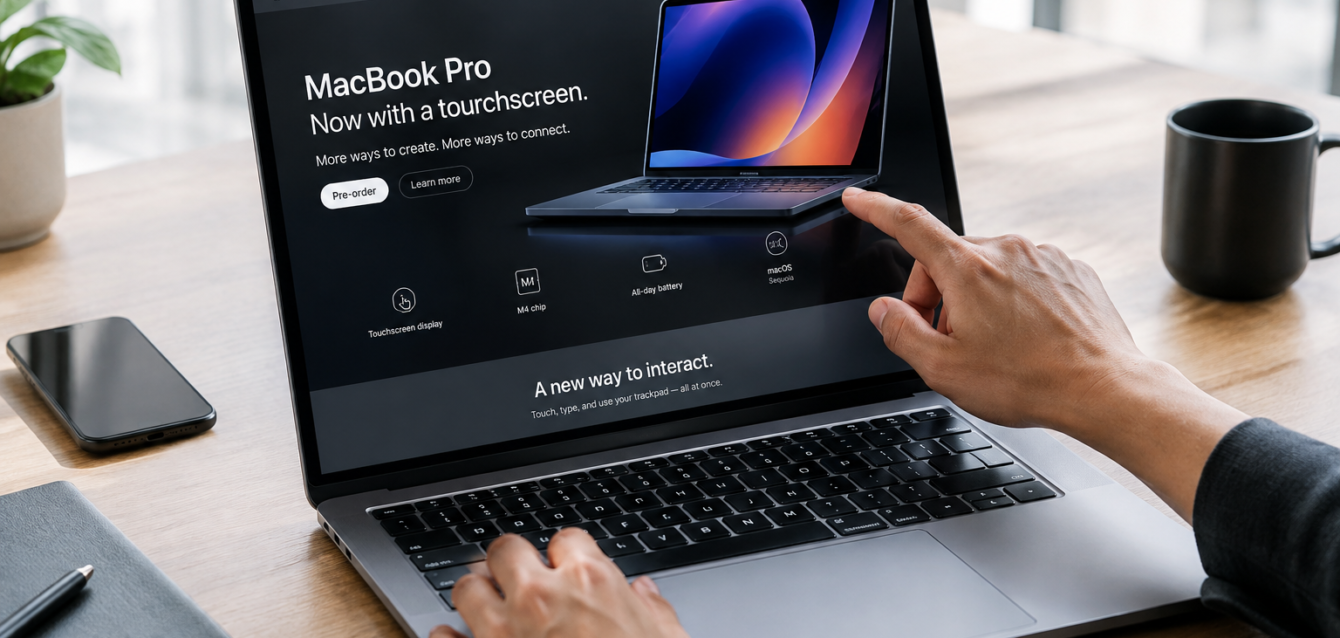
Apple spent years saying no. Now it has said yes. On October 28, 2026, Apple announced its first touchscreen MacBook Pro, with a 14-inch model starting at $2,899 and a 16-inch starting at $3,399. Pre-orders open October 30, and it ships November 6.
For designers and business owners, the price isn’t the headline. The headline is that designing for touch just became relevant for every laptop screen, including the Mac. Here’s what changes for touch UI design and web design, and what to do about it.
Why a Touchscreen MacBook Matters for Design
Touchscreen Windows laptops have existed for years, so this isn’t brand new. What’s new is scale and attention. Apple’s Mac audience includes a huge share of designers, founders, and creative professionals, and the websites and apps they visit will now be touched, clicked, and typed on, sometimes in the same minute.
That’s the real shift: hybrid input. One screen, with a trackpad, a keyboard, and fingers. Apple has pitched touch for things like dragging slides between presentations, and for developers testing apps directly on the laptop. If your design assumes a single input type, it will feel off to someone. That’s how touchscreen laptops change web design: one screen now serves fingers, trackpads, and keyboards at once. Touchscreen MacBook Pro design choices, like a hinge built to steady the screen when touched, show Apple takes touch seriously.
7 Ways Touchscreen Laptops Change UI and Web Design
1. Make touch targets bigger
Tiny links and icon buttons are hard to hit with a finger. Apple’s guidelines suggest at least 44 points, and accessibility standards set an even lower minimum, so treat those as floors, not goals. Generous touch target size best practices also help mouse users, and accessible touch interface design helps people with motor difficulties.
2. Don’t depend on hover
Hover menus and tooltips don’t exist for fingers. Make sure every action works with a tap, and treat hover as a bonus, not the only way to reveal content. Hover states on touch devices should never hide something essential.
3. Space things out
Crowded buttons cause misclicks and frustration. Add padding between clickable elements so fingers don’t trigger the wrong one.
4. Keep key actions within easy reach
Reaching up to the top of a laptop screen all day gets tiring. Keep primary buttons, forms, and navigation easy to reach, and avoid forcing long reaches for common tasks.
5. Offer alternatives to gestures
Swipes, pinches, and drags feel natural on touch, but they must have a clear alternative for mouse and keyboard users. A carousel needs arrow buttons, and a drag-and-drop list needs a simple move option.
6. Design for touch and mouse together
Designing for touch and mouse means testing both. Don’t build “a mobile version” and “a desktop version” and stop there. Screen width no longer tells you how someone is interacting, so layouts need flexible, input-aware behavior. Mobile-first vs touch-first design is the wrong debate; responsive design now has to respond to input, not just width.
7. Test on real hardware
Emulators miss things like finger smudges, hand shadows, and tiredness. Test on actual touchscreen laptops, tablets, and phones before launch.
What This Means for Landing Pages and Conversions
Touch-friendly web design starts with your highest-traffic pages, and touch-friendly landing page design is where it pays off fastest. Large, clear CTA buttons, short forms with big fields, and no hover-only content remove friction at the exact moment a visitor decides to act. If you’re asking why a landing page isn’t converting, awkward tap targets are a quiet culprit.
Presentations and pitch decks matter too. If investors will review your deck on a touchscreen laptop, make sure navigation controls are large and slides read well when swiped through.
Is It Time to Panic? No.
At this price, early adopters will be a small slice of your audience. You don’t need a redesign this week. But touch has been normal on phones and tablets for years, and now it’s arriving on the laptop, so the smart move is to audit your key pages and fix the obvious problems.
A Quick Touch-Friendly Checklist
• Tap targets are comfortably large and well spaced
• Every hover action has a tap alternative
• Menus, carousels, and sliders work with a finger and a mouse
• Forms are easy to fill with touch and a keyboard
• Pages load fast and don’t shift while people tap
How The Dreamer Designs Can Help
Touch-friendly UI design for touchscreen laptops isn’t a trend you can bolt on. It’s a design habit. At The Dreamer Designs, our website design services and landing page teams build for every kind of input, and our CRO work finds the friction that costs you conversions. Presenting to investors or clients? Our presentation design and pitch deck services keep your slides sharp on any screen.
FAQs
Is the new MacBook Pro really a touchscreen?
Yes. Apple announced its first touchscreen MacBook Pro on October 28, 2026, with the 14-inch and 16-inch models arriving November 6.
Do I need to redesign my website for touchscreen laptops?
Not necessarily. Audit your key pages for small tap targets and hover-only features, then fix what you find.
What is a good touch target size?
Apple suggests at least 44 points. Bigger is safer, especially for primary buttons.
Final Thoughts
A touchscreen MacBook is a reminder that people use screens in many ways at once. Design for fingers, mouse, and keyboard, test on real devices, and you’ll be ready no matter how your visitors choose to interact.
Ready for a Touch-Friendly Website?
At The Dreamer Designs, we design websites and landing pages that work beautifully on every device. Trusted by 300+ brands.
Start your project with The Dreamer Designs